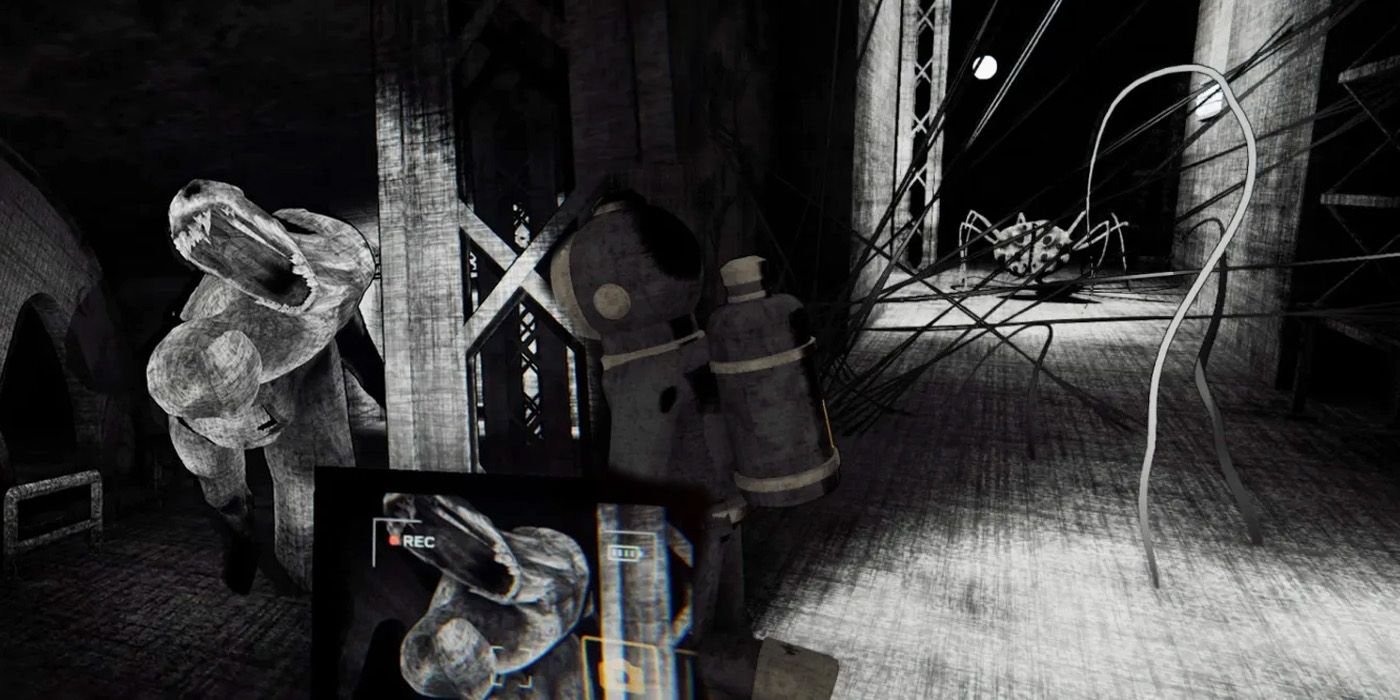
8 Best Ways To Score More Views In Content Warning
In Content Warning, you and your friends will brave the depths of the Old World to get spooky footage and get as many views as possible. The aim is to dive into the depths, record the horrors below, and make it out alive to upload your hard-earned footage and appease the masses.
You will start with very little in terms of instructions and equipment, but you will quickly get the hang of the relatively simple instructions and get views without dying (too much). Like in Lethal Company, you will have a few days/dives to get the footage and views needed to hit their quota.
Related How To Film Something Scary In Content Warning It can be hard to understand what it means to film "something scary" in Content Warning at first glance thanks to the creepy nature of the Old World.
8 Use The Proximity Chat Function
It Seems Louder Does Equal Better
In classic YouTube, sorry, SpookTube, fashion, your viewers like to hear you scream. Anything you say through the in-game chat while recording will be picked up by the camera and then broadcast to your adoring audience as long as you make it out with the camera. This will give your views a boost while also increasing your immersion. Plus, if your friends die far away, you won't have to hear them scream. If you're not convinced, check out habie147's video covering Content Warning's use of proximity chat.
While Discord is helpful, you lose out on the genuinely wonderful proximity-based chat that Content Warning offers. Like Among Us' proximity chat mod, this feature improves Content Warning gameplay. There's nothing quite as funny as hearing a compatriot's shout from a few rooms away as they're chased down by a snail man or caged by a living captcha. Discord can do a lot, but nothing will connect you and your viewers to the game more than using the game's native voice channel.
7 Purchase Smart Upgrades
Stay Alive As Long As Possible
Close
Though you start out with only a camera and four flashlights, you'll quickly get more views and, therefore, earn some cash. There are many options as to what you could go for, but a few upgrades make more sense than others. To start, grabbing either of the Medical items, the Hugger or a Defibrillator, will help you and your team survive longer.
Equipment Cost The Hugger $100 Defibrillator $300
The Hugger is a healing item that can be used to patch up a teammate after a harrowing encounter. The Defibrillator is a bit stronger, reviving teammates after they've been killed. This is particularly important when you've lost your cameraman, as flashlights attract attention, and getting your camera out safely is always your number one priority.
6 Capture Everything
Do It For the Content
While someone must make it out alive to make the footage to your SpookTube channel, everyone doesn't have to make it out of the Old World. It can be good for viewers if you get a good shot of one of your team members dying, and recording their body after the fact can also help. It's good practice to get everything you can while you're down there, and if you don't have the healing items, they're not coming back anyway.
It's generally best practice that a player with a flashlight leads the way once your team lands while another follows behind with the camera. The first player will attract the creepies and the crawlies with their flashlight while the camera operator gets the best shot that they can without dying themselves. You shouldn't aim to die, but if it happens, at least make sure you're getting the views out of it.
5 Get That Camera Back
Recovery is Tricky But Not Impossible
If your camera operator dies, and you have to extract without your camera, you can always return and get it on your next dive. If you lose too much footage, you won't make quota, which LuxieGames on Twitch learned the hard way. Keep track of your camera, but if you don't, it's okay.
Unlike regular equipment, it will lie on the ground near where its operator died, but keep in mind the manner of their death. If they were blown up or fell from a height and then died, the camera might have bounced or gotten blasted away from their body. Please take a look around and make sure it's found.
The camera will not glow like a typical dropped camera, and you can no longer record with it, but the footage on its tape can still be salvaged with the footage extractor on the surface. Like good scrap in Lethal Company, this recovered footage might become the difference between meeting and missing your quota. Once you've got it, it's a good idea to chuck that camera into the diving bell before continuing, as it will return to the surface regardless of your team's survival.
4 Use The Selfie Mode
Flash Those Pearly Whites
Content Warning has a few different camera tricks, and selfie mode is one of the best. Entering selfie mode allows viewers to put a name to your customized emoticon face and makes your videos just a bit more personal. Ensure your footage is a good mix of your team, spooky stuff, tense moments, and exploration so your audience doesn't get bored.
There are only 90 seconds of film on the camera, and no audience wants to watch darkness for a minute and a half. Selfie mode is a silly way to spice up those otherwise tense videos. While you're at it, throw an emote in there, too, which can be purchased from the upgrade shop before you dive each day.
3 Film Something Other Than Monsters
Lasers Are Scary, Too
While filming the many inhabitants of the Old World is the best way to help your views skyrocket, it's also the easiest way to die and lose your camera. To balance this out, film other stuff. Use the selfie mode and in-game mic to film a goofy intro, take some serious ambiance shots in the game's many spooky corridors, or even film your teammates falling off stuff! You can even film the piles of bones lying around to give your team a break.
Trying to push for too many monster shots will kill your teammates, so finding other stuff to film is essential. The Old World is full of exciting sights and sounds that captivate your audience, so don't be afraid to chill once you've got your viral video. Get some b-roll of a cool bone or lasers, then call it a day.
2 Buy The Boom Mic
Grab Better Equipment from the Shop
Alongside cosmetics like emotes and healing items like the Defibrillator and Hugger, you can buy better recording equipment in the shop to improve your video. The Boom Mic will allow your viewers to hear everything you're hearing, while devices like the Clapper and Sound Player will help raise the quality of your video.
The Clapper allows you to add transitions to your video, while the Sound Player acts like any soundboard. Be careful because these sounds will attract monsters like Lethal Company's Radar Boosters.
Equipment Cost Boom Mic $100
With these extra tools, your videos can go from amateur-found footage to A-tier SpookTube material. Choose carefully; be aware that this equipment isn't as safe as the camera. If you go back up in the dive bell without picking it up, it's gone forever. Keep this in mind as you're running for your life from whatever killed your mic-carrying teammate.
1 Look At Your Chat
Chat, Is This Real?
At the end of the day, viewers will tell you what they want to see. To know a bit more about what your audience is interested in, be sure to pay attention to what grabs their attention as you're watching your footage back. Maybe, like in the image above, your chat really likes the voice of one of your teammates. If that's the case, maybe you've found a new narrator.
Generally, chatters will like stuff that's interesting and new. When you first see a monster, your viewers will be interested in it, but after you die a few times, it will lose its luster pretty fast. Keep your content interesting and varied, and you'll become a viral Content Warning hit in no time. Go forth, brave videographer, and capture all the horrors that this game has to offer!
Source: habie147/Youtube, LuxieGames/Twitch






COMMENTS