Nacon Revolution 5 Pro Controller Review: Plenty Of Customization
Summary Nacon's Revolution 5 Pro offers extreme customizability with interchangeable parts and a longer charging cable than standard controllers.
Stick layout and head choices cater to different playstyles, allowing for optimal comfort and precision depending on individual preferences.
Built-in Bluetooth 5.2 connectivity and back buttons offer added convenience, although haptic feedback is absent in this $199 pro controller.
In the three years following the PlayStation 5's launch, many "pro" controllers have entered the market, including Sony's own DualSense Edge, and Nacon has now entered the fray with the Revolution 5 Pro. Nacon has a long history with officially licensed PlayStation controllers, and while this is a step up from its predecessors with the features that are included, there are some noticeable omissions that may baffle those who are already accustomed to the standard PlayStation 5 DualSense controller.
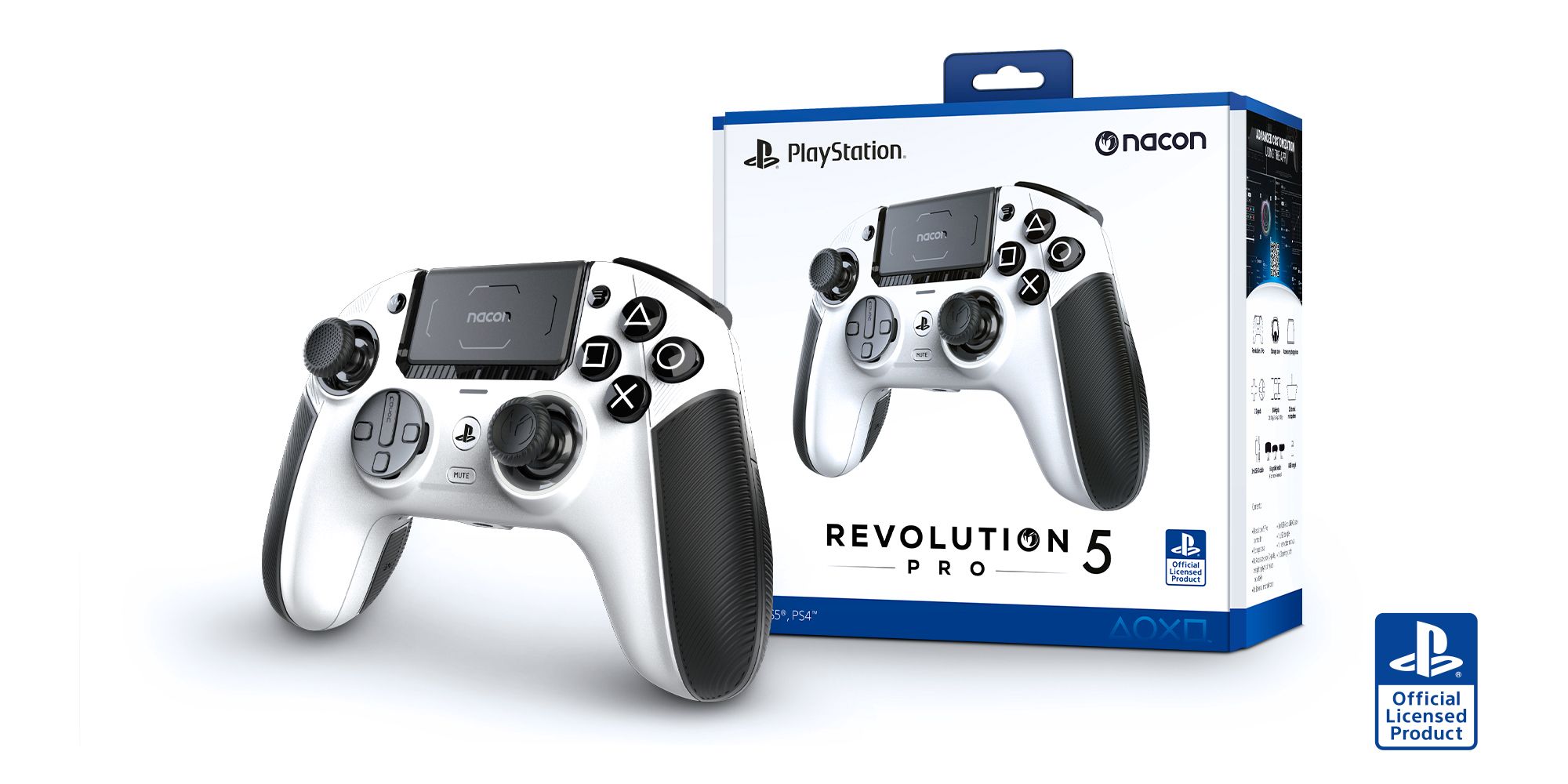
One thing that may take some long-term PlayStation players some time to get used to is that the Revolution 5 Pro has an offset, asymmetrical stick layout that Xbox players will already be comfortable with but may be a controversial choice for long-term PlayStation fans who prefer the side-by-side layout. Nacon had previously released several controllers with the default PlayStation stick layout for the PlayStation 4, but seeing as all of Nacon's pro controllers across both PlayStation and Xbox have an asymmetrical stick design, this shouldn't come as a surprise to those who have followed the company's previous releases.
Related PlayStation 5 Review: Very Big and A Little Bold Better performance and an amazing new controller highlight what's otherwise a rather iterative upgrade with the PlayStation 5 console.
The Revolution 5 Pro Controller Is Extremely Customizable
Even The Weight Can Be Changed
Close
One major selling point for the Revolution 5 Pro controller is how customizable it is. A whole box of interchangeable parts is included in a neat nook of the travel case, along with a cleaning cloth and an extremely reasonable 3-meter-long USB-A to USB-C charging cable rather than the 1-meter or 500-centimeter cables that come with most controllers, including Sony's DualSense, ensuring that players can quickly swap from its wireless dongle to a wired connection without having to sit extremely close to their controller.
A single charge provides approximately 10 hours of battery life, which is significantly more than the DualSense Edge's five or six hours.
The inclusion of interchangeable weights is also an interesting one, albeit a feature I found myself less bothered with using. While at a maximum weight of 16g in each controller grip, they won't exactly replace a gym membership, this slight shift could make for a more comfortable play session after some experimentation, depending on how players hold the controller. However, I found myself not using these as much as the default weight seemed to suit me just fine, so whether someone will use these will largely come down to personal preference.
Everything included with the Revolution 5 Pro controller is as follows:
Revolution 5 Pro controller
Storage case
Accessory storage box
2 D-pads
Metal joystick rings (2x 30°, 2x 38°)
6 weights (2x 10g, 2x 14g, 2x 16g)
6 Joystick heads (2 short concave, 2 tall convex, 2 short convex)
External microphone (connected via the controller's 3mm jack port)
3-meter USB-A to USB-C cable
USB dongle for wireless connection
While a Quick Start guide and various health and safety and warranty booklets are included, surprisingly, the full manual that walks players through how to swap out these parts isn't, and is only available online on the Nacon website.
Related Sony Prepares For PS6 As PS5 Approaches "Latter Half" Of Life Cycle Sony has confirmed that the PlayStation 5 is entering the latter half of its life cycle just over three years since its launch in November 2020.
The Different Interchangeable Sticks Each Have Their Uses
The Designs Are Better Suited To Different Playstyles And Genres
The Revolution 5 Pro controller comes with a variety of different types of stick options that use magnetic Hall Sensor technology to avoid the dreaded - and extremely common - stick drift seen in some other controllers as they always return to their initial position. While most players will likely find the type they like and stick to it, it's worth experimenting with the other kinds as they each have their own uses depending on playstyles and genre.
For example, I found that the shorter interchangeable sticks have more texture and are ideal for more fast-paced gameplay, and I found them better for most shooters like Helldivers 2 or action-adventure titles like Marvel's Spider-Man 2 due to their closer proximity to the face buttons and D-Pad. I personally used the concave ones the most out of the two simply because they better suited the shape of my thumbs and felt more comfortable for longer gaming sessions, but this is simply a matter of preference and the shorter convex ones may prove to be more popular with those who preferred those kinds of sticks on the PS2 and PS3 controllers.
That's not to say the thicker toppers didn't have their uses either. I tend to play with sniper and stealth builds in titles such as Ghost Recon Wildlands (via backward compatibility) and this extra height helped more with precision in these kinds of scenarios, although the smoothness of these heads was a contrast to the others, as it offered little to no grip.
The Revolution 5 Pro Controller's Buttons Have A Tactile Feel
But Its Back Buttons Were In An Awkward Place
The Revolution 5 Pro sports an incredibly tactile design, with its textured rubberized grips and overall chunkier feel. Its face buttons are large and clicky, with minimal wiggle room in each slot and a circle button that even arches round to the right-hand side. The default D-pad features a circular design similar to those of other Pro controllers like the Xbox Elite that allow for 8 directions, but can also be swapped out for a more traditional 4 directional design if preferred, which I preferred when entering Stratagems in Helldivers 2 due to how specific they are, as the traditional 4-way buttons left little room for error. Much like other Pro controllers, there was also the option to adjust the trigger stops with a toggle located below the L2 and R2 buttons.
Unfortunately, the design of the back buttons was less intuitive in its placement. Back buttons can be extremely useful for shortcutting keys to reduce how often players have to move their thumbs and instead use the places players' fingers naturally rest. Whereas the aforementioned Xbox Elite controller and DualSense Edge had back buttons that could be removed, the Revolution 5 Pro's are built-in, with two lower ones running down almost the entirety of the inside of the controller grips. This makes for a much larger area covered than many back buttons, with them being quite a bit lower as well. Unfortunately, this occasionally put me at a disadvantage, as I found myself regularly hitting the buttons as I played by mistake.
Four custom profiles can be set to map the buttons when using the PC app, and these can be toggled using the profile button on the back of the controller. The A and C toggle on the other side of the controller also stands for "Advanced" and "Classic" with Classic allowing for quick customization such as button mapping, trigger travel data range, and audio controls via the controller's touchpad, and Advanced referring to the further customization available when using the PC app.
Related Best PS5 Games Of 2024 (So Far) 2024 has only just begun, but the PS5 is already off to an incredible start, delivering a number of must-play titles in a variety of genres.
Bluetooth Headphones Can Be Connected Directly To The Controller
Opening Up So Many Audio Options For Players
Custom Image by Glenn Bunn
At the bottom of the controller is the option for built-in Bluetooth 5.2 connectivity and on-device controls for volume, which bypasses PS5 and PS4 console restrictions for Bluetooth headphones entirely as they're connected directly to the controller rather than the console. This opens up the audio options for so many more players who don't own a wired or PlayStation-compatible wireless headset, as they can now use any kind of Bluetooth headphones, including Apple's AirPods.
Sadly, There's No Haptic Feedback
Such Features Are Still Exclusive To Sony's DualSense Controllers
Something that felt sorely missing when coming from the standard DualSense controller included in my PlayStation 5 to the Revolution 5 Pro was the lack of haptic feedback or trigger resistance. Revisiting a title such as Marvel's Spider-Man 2 when its New Game Plus update launched felt slightly emptier and more lifeless as an experience compared to my first playthrough due to just how many sounds and haptics Insomniac added to showcase the DualSense controller's features while swinging around the city or using Miles' Venom blasts in combat, and it initially felt like a major oversight on Nacon's part to omit them.
Further research did show that this is the case for all officially licensed PS5 controllers at present, unfortunately, as PlayStation wants to keep haptic feedback and trigger resistance exclusive to the DualSense and DualSense Edge. This is a shame, but it's a requirement for any third party trying to secure licensing. The Revolution 5 Pro does have two rumble motors, but these only work when it's connected to a PS4 or PC, which feels odd considering it's primarily marketed as a PlayStation 5 controller.
Nacon's Revolution 5 Pro is a solid controller with plenty of customization options and features available to tailor it to a player's specific needs.
Whether this is a dealbreaker for players comes down entirely to how much they enjoy the DualSense experience, which was heavily marketed as a unique selling point of the PlayStation 5 console as a further way to immerse a player in a game. Considering Sony's "pro" controller, the DualSense Edge costs roughly the same as the Revolution 5 Pro at around the $200 mark, if haptics are that important to one's personal preference, and they're fine with a significantly reduced battery life and some different kinds of customization features as an exchange, they may be better spending their money there instead.
Overall, Nacon's Revolution 5 Pro is a solid controller with plenty of customization options and features available to tailor it to a player's specific needs. There are some faults with it that may turn players off, however, and at a hefty $199 price tag they would be wise to weigh up whether these issues and missing features such as haptics are worth it if they're looking for a pro controller for their PlayStation 5.







COMMENTS